Niagato: A Joyful Handwritten Font for Makers and Creative Sellers
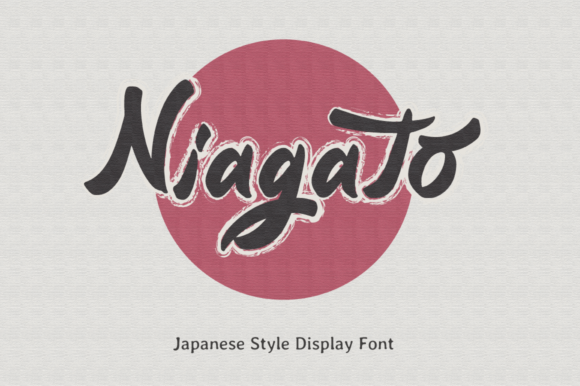
As I sat at my desk last week, preparing a fresh set of candle labels for a new seasonal line, I opened my font library and landed on Niagato. The moment I typed out “Lavender Fields” in that bouncy, whimsical script, I knew this font was going to bring something special to my product presentation. Niagato is a cute and quirky handwritten font that radiates personality and warmth—perfect for makers who want to infuse a little charm into their designs.
What immediately stood out to me was how effortlessly Niagato balanced playfulness with clarity. It’s not overly exaggerated like some script fonts can be, but it still carries that unmistakable handwritten charm. The letters flow smoothly, with just the right amount of bounce and variation in stroke weight. It feels like someone sat down with a favorite pen and wrote out each word with care and joy. That kind of personality is exactly what handmade sellers need to make their products feel personal and memorable.
I first used Niagato on a set of greeting cards for a spring collection. The font was perfect for the titles and accent phrases—like “Thinking of You” or “You’re a Gem”—because it added a soft, human touch without overwhelming the design. It also scaled beautifully from small greeting card titles to larger digital download headers. I noticed that even when printed on a basic home printer, the font maintained its character and legibility, which is a big win when you're producing in batches.
Real-World Uses for Niagato in Handmade Shops
If you're a candle maker, boutique owner, or printable creator, Niagato can be a valuable addition to your design toolkit. Here are some of the ways I’ve used it across different product types:
- Candle Labels: From soy candles to beeswax tapers, Niagato adds a warm, artisanal feel to product names and scent descriptions.
- Wedding Invitations: I used it for the couple’s names and event titles on a rustic-themed invitation suite. It paired beautifully with a clean serif font for the body text.
- Digital Wall Art: For a set of minimalist nursery prints, Niagato brought a softness and handmade appeal to phrases like “Dream Big” and “Little One.”
- Product Tags: When designing hang tags for handmade soap bars, Niagato added a sweet, boutique-style touch that elevated the overall packaging.
- Seasonal Stickers: I tested it in a sticker design for a fall planner kit and loved how the font’s bounce made phrases like “Cozy Vibes” and “Pumpkin Spice” feel more lively.
One of the most satisfying parts of using Niagato was how it helped unify my brand across different formats—physical labels, digital mockups, and social media graphics all felt like part of the same joyful story. That kind of consistency helps customers recognize and remember your shop, which is crucial for small businesses.
Design Tips for Using Niagato Effectively
While Niagato shines in short phrases, titles, and decorative elements, it’s not ideal for long paragraphs. Think of it as a display font that adds visual interest and emotional appeal. If you're designing a printable planner page, for example, use Niagato for section headers and save a simpler font for the daily grids.
When working with cutting machines like Cricut or Silhouette, make sure to adjust the spacing and size carefully. Niagato's swashes and ligatures can be delicate, so test on a small sticker or vinyl cut before committing to a large run. For printed cards or labels, always preview at actual size to ensure legibility—especially when using it in smaller sizes.
Pairing Niagato with Other Fonts
One of the joys of working with script fonts is experimenting with font pairings. Niagato pairs especially well with clean sans serif fonts like Montserrat or Lato for a modern handmade look. If you're going for a more vintage or romantic vibe, try combining it with a simple serif font for body text. I’ve also used it alongside a bold modern sans serif for contrast in boutique tags and tote bag designs.
For digital downloads or printables, consider how the font will appear on screen versus print. Niagato’s delicate strokes render well digitally, especially when used at a slightly larger size for titles or preview images in your shop listings.
What to Know Before You Sell
Before using Niagato in commercial products—whether it’s physical packaging, digital templates, or SVG files for cutting machines—make sure to check the licensing. Many premium fonts come with commercial use permissions, but it’s always wise to verify. Also, check what styles, alternates, ligatures, and file formats are included. Niagato typically includes multiple OpenType features that allow for more creative flexibility, especially when designing invitations or boutique tags.
If you're creating multilingual products or printables, confirm whether the font supports extended language sets. This is especially important for sellers with international customers or those offering templates in multiple languages.
Why Niagato Belongs in Your Font Collection
As a maker, I’m always looking for tools that help me create with both heart and efficiency. Niagato has become a go-to in my design workflow because it adds that handmade, personal feel without sacrificing professionalism. Whether I’m designing a boutique tag for a handmade soap bar or a digital preview for a downloadable quote print, Niagato consistently brings a smile to my screen—and, I hope, to my customers’ faces as well.
If you’re in the Script Amp category or exploring Fonts for your next product line, Niagato is worth a closer look. It’s more than just a typeface—it’s a storytelling tool that helps your handmade brand feel warm, authentic, and uniquely yours.